
If you’re using a scheduling tool to book appointments, interviews, demos, or therapy sessions, managing email notifications shouldn’t feel like busywork. Yet that’s exactly what one of our clients was experiencing with their booking confirmations.
“If I want to change something in my confirmation emails and I have three scheduling links, I have to go to three different places to make the same change,” they told us.
Sound familiar? Imagine updating your email signature, tweaking your cancellation policy, or refreshing your branding. With the old system, you’d need to:
Open each scheduling link separately
Navigate to Email Notifications for each one
Make the identical change three, five, or even ten times
Save and repeat
For businesses managing multiple services, this repetitive workflow was eating up valuable time, whether you’re scheduling interviews, booking yoga classes, coordinating therapy sessions, or setting up sales demos.
Why We Couldn’t Just Use One Global Setting
Before diving into the solution, let’s address this: why not just have one email template for everything?
The answer is simple, customization matters. Different appointment types require different communication:
Therapy sessions need empathetic, professional language
Sales demos and interviews should be energetic and value-focused
Yoga classes and group workshops require logistical details that 1-on-1 appointments don’t need
Cancellation policies vary depending on the service type
We needed a solution that eliminated repetitive work while preserving the flexibility our users rely on.
Our Solution: Two-Tier Email Notification System
After analyzing the workflow bottleneck, we completely redesigned how email notifications work in NeetoCal. Here’s what changed:
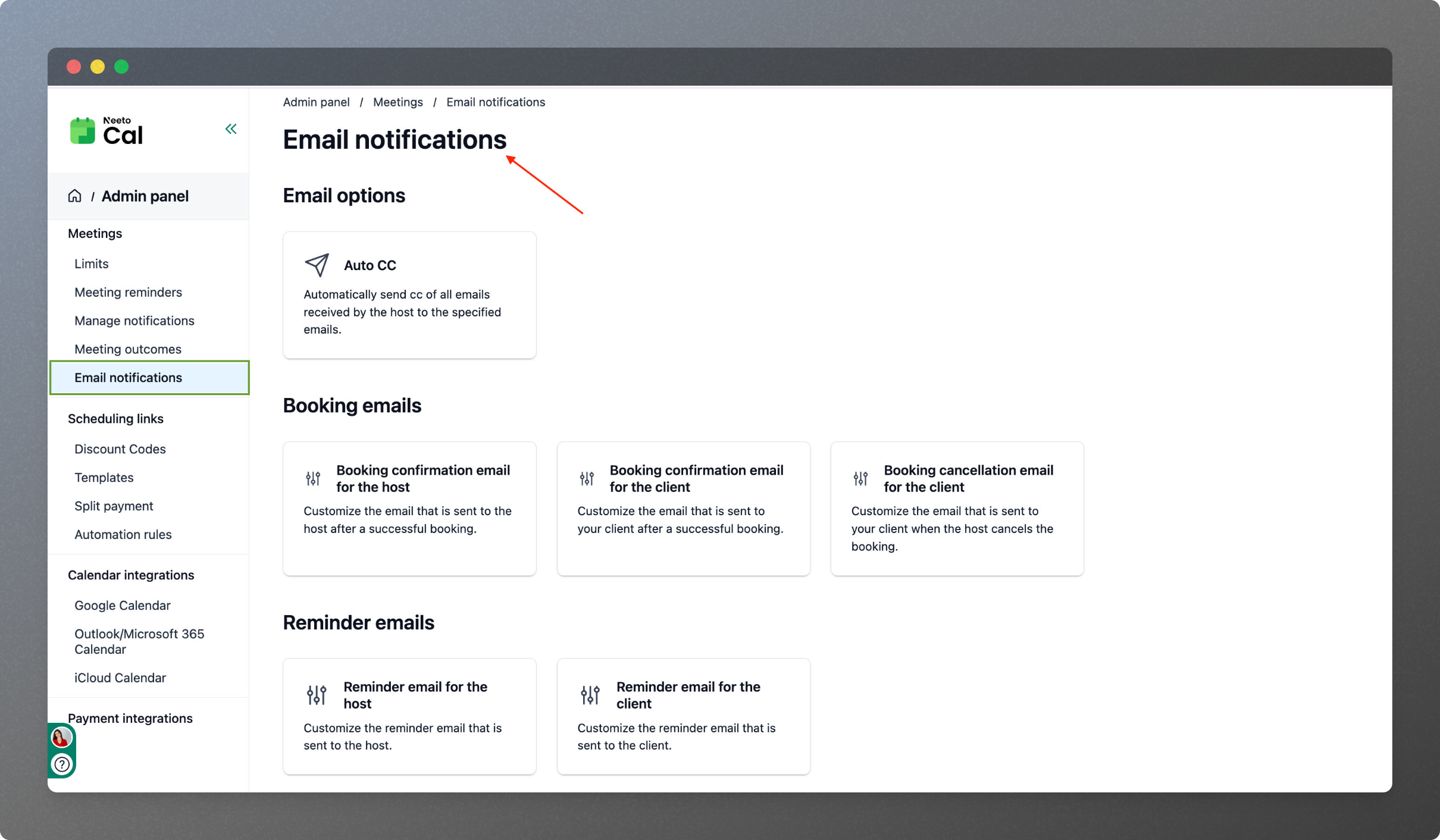
Global Email Templates in Your Admin Panel
We introduced workspace-level control that gives you:
✓ Default email notifications that apply across all scheduling links
✓ One-click updates for company-wide changes
✓ Consistent branding across your entire booking experience
✓ Live preview so you see exactly what clients receive
Need to update your signature across all booking types? Now it takes 30 seconds instead of 30 minutes.
Custom Emails When You Need Them
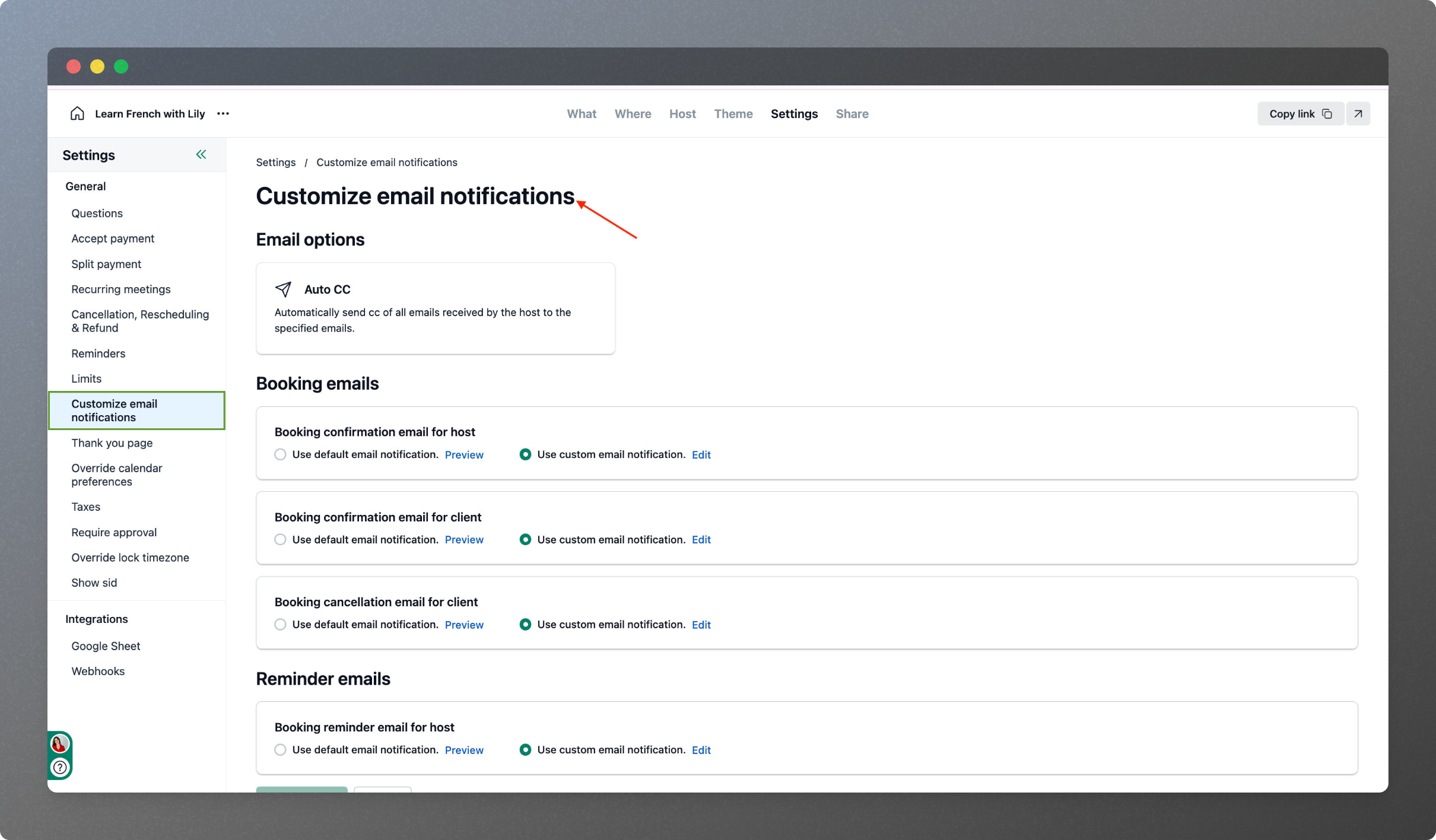
On each individual scheduling link, you’ll find a new “Customize Email Notifications” option with two modes:
Use Default Mode
Automatically inherits your admin panel settings. Perfect for maintaining consistency across similar appointment types.
Custom Mode
Override global settings with service-specific content when your therapy sessions need different messaging than your sales demos, or when your yoga classes require different instructions than your interview bookings.
This gives you the best of both worlds: efficiency when you want it, flexibility when you need it.
Seamless Migration: Zero Disruption Guaranteed
Changing a core feature like email notifications is risky. One wrong move and you could break thousands of existing booking workflows.
Here’s how we ensured a smooth transition:
For users with customized emails: We preserved every customization under “Custom” mode on each scheduling link. Nothing changed, nothing broke.
For users with default emails: We automatically set them to “Use Default” mode, pulling from the new admin panel.
Admin panel baseline: We populated it with NeetoCal’s standard email templates as your starting point.
The result? Every single client’s emails continued working exactly as before—but with new flexibility moving forward.
What We Learned About Product Development
The best product improvements don’t always involve flashy new features. Sometimes, they’re about removing friction from everyday tasks.
Our client didn’t ask for AI-powered email writers or advanced automation. They simply wanted to stop repeating the same action over and over.
By listening closely and designing a solution that balances flexibility with simplicity, we transformed a daily frustration into a streamlined workflow.
This is the NeetoCal approach: we listen to real user problems, solve them thoughtfully, and never disrupt what’s already working.
Struggling with workflow issues in your current appointment booking software? We’d love to hear about your pain points.
Ready to simplify your scheduling workflow? Try NeetoCal today and experience a smarter way to manage your calendar—no back-and-forth needed.